
Deploying DeepSeek-R1-671B Locally
The DeepSeek-R1 LLM has strong reasoning capabilities and shows major gains on math, code, and natural language reasoning tasks. Official and third-party online services are all unstable to some degree, and data security and privacy are a concern, so self-hosting the open-source DeepSeek model is a good option for individuals and companies alike. This post walks through deploying and testing the full-parameter deepseek-r1-671b model. The same process also applies to deepseek-v3-671b and to the smaller versions.
Introduction
The largest version of the DeepSeek-R1 model is 671B (671 billion parameters). Smaller distilled versions from 1.5B to 70B are also available, so you can pick the version that fits your hardware. The main deciding factor is GPU memory. In general, you need enough VRAM to load the entire model file into GPU memory in order to make full use of the GPU's compute and get reasonable speed.
ollama is an open-source framework for managing models: you can use it to download, run, and manage LLMs. It is currently the simplest open-source framework for running LLMs locally, and it is the one used in this post. The ollama model library shows how much space each model takes up:
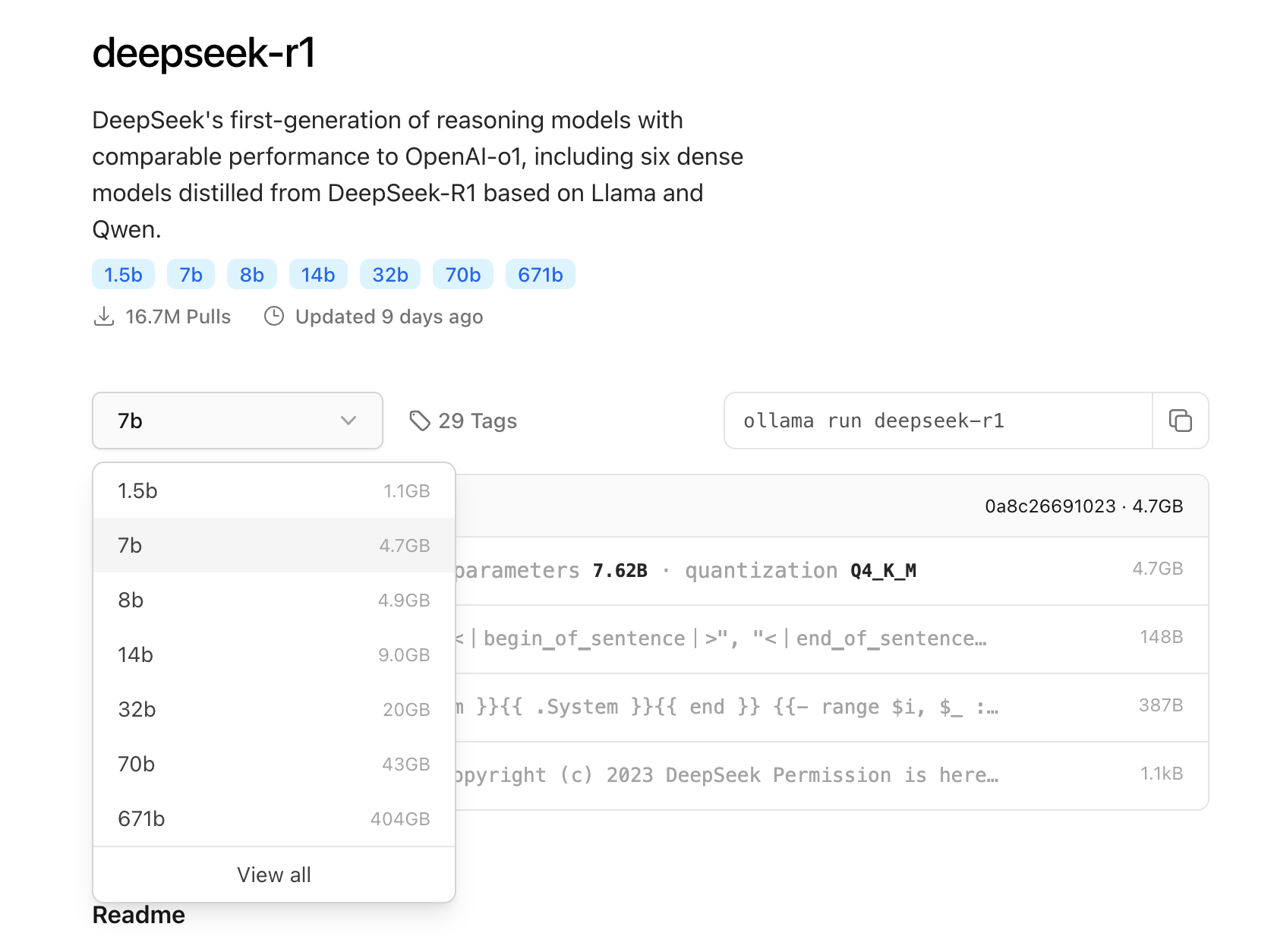
Models in ollama are INT4-quantized by default, which shrinks the model file at the cost of a small loss in precision. Going by the model sizes in the image, the 1.5b to 32b models can all potentially be deployed on a personal computer.
The 1.5b model runs on most personal computers and even on phones. With more than 6G of VRAM you can deploy the 7b model, and with 16G of VRAM you can try the 14b model. The 32b model needs a GPU with 24G of VRAM, such as the 3090 / 4090 series, and the 70B model needs at least two GPUs with 24G of VRAM each. If you are short on VRAM but have enough RAM, you can still try running it, but it will fall back to mixed CPU+GPU inference, which is much slower than pure GPU mode.
Note: DeepSeek's smaller 1.5B to 70B R1 models are produced through "distillation". Distillation is a form of knowledge transfer: other open-source models (such as qwen and llama) serve as the base, and the large DeepSeek-R1 model is used to train them, so that these smaller models learn R1's outputs and thinking process. This greatly reduces the parameter count while retaining a good share of the performance and accuracy.
Preparation
The official full version of DeepSeek-R1 uses FP8 precision and is about 700G in total. The quantized version provided by Ollama is 404GB. We chose to run it on 8 A800 GPUs with 640GB of VRAM in total, which fits the whole model and leaves some headroom for long contexts.
1. Environment Setup
Hardware:
- GPU: 8 * A800 (at least 6 GPUs required)
- VRAM: 8 * 80G
- vCPU: 112 cores
- RAM: 224G
Software:
- OS: ubuntu 20.04
- PyTorch: 2.6.0
- CUDA: 12.2
- ollama: latest version
On Linux, run nvidia-smi in a terminal to see GPU information:
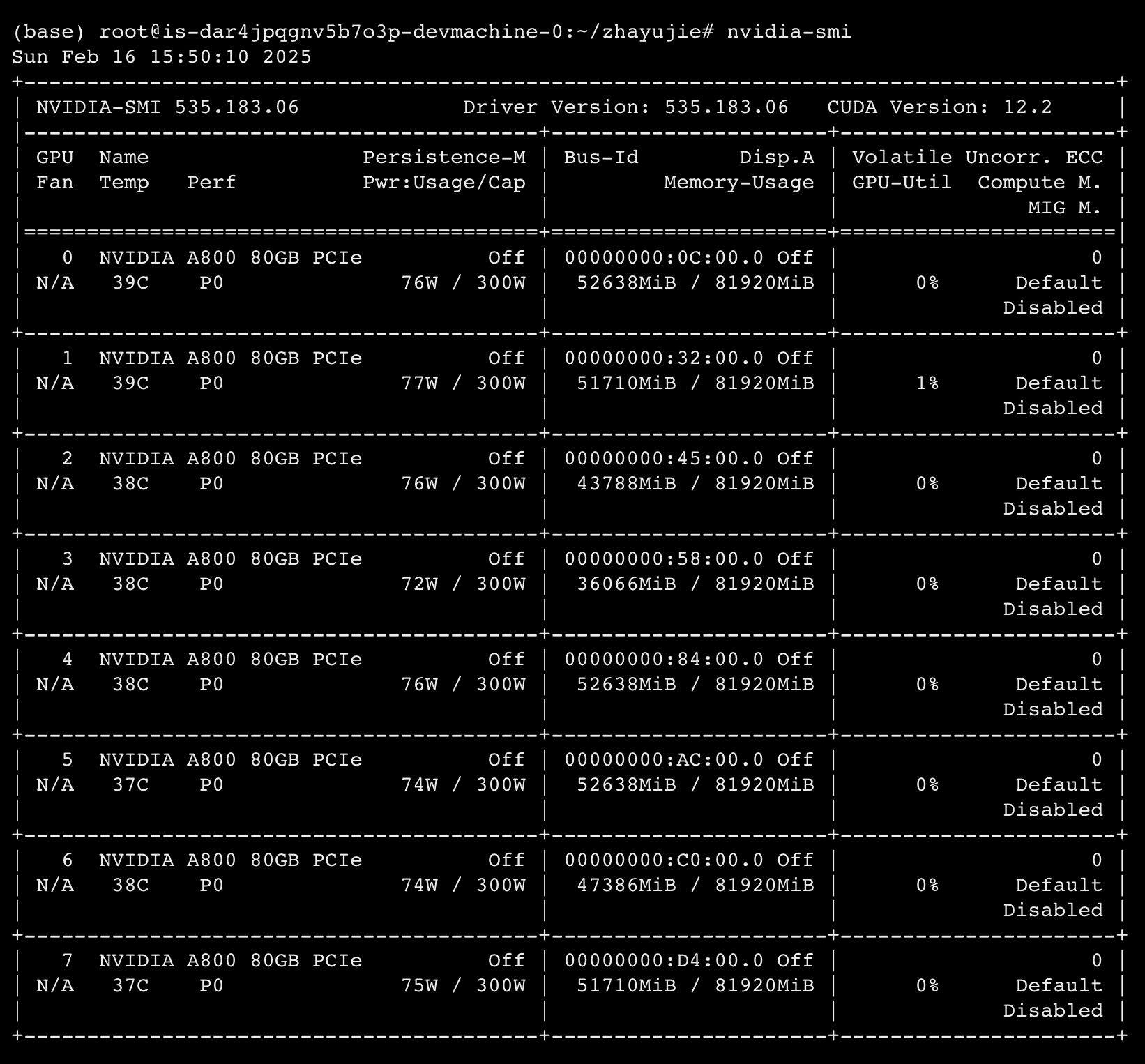
Cost: a single A100/A800 GPU costs roughly RMB 100,000 to buy, and renting one on an online GPU rental platform costs about RMB 5 per GPU per hour. If you need more performance, there are also GPUs such as the H100/H800 and H20.
2. Installing Ollama
Go to the ollama website to download and install ollama. It supports Windows, macOS, and Linux. On Linux, run this command in a terminal:
curl -fsSL https://ollama.com/install.sh | shAfter installation, run ollama -v. If it prints the version, the installation succeeded.
Running
1. Configuring ollama Environment Variables
A few environment variables need to be set before starting the ollama service. Downloaded models are saved to ~/.ollama/models by default. If you want to change this path (for example, to store models on the server's data disk rather than the system disk), run the following command, replacing the path with the one you actually want:
export OLLAMA_MODELS=/datadiskA few other environment variables are very helpful when running a model as large as 671b, and I recommend setting them:
export OLLAMA_DEBUG=1              # enable debug logs to see model loading progress and errors
export OLLAMA_LOAD_TIMEOUT=120m    # timeout for loading the model, default 5 minutes. Prevents exiting on load timeout
export OLLAMA_KEEP_ALIVE=-1      # default 5 minutes: the model is unloaded if not accessed for 5 min after running. -1 keeps it resident in VRAM
export OLLAMA_SCHED_SPREAD=1  # needed for multiple GPUs: schedules model inference evenly across GPUs
Ollama's default concurrency is 1, meaning each request has to finish before the next one starts. To increase concurrency, set:
export OLLAMA_NUM_PARALLEL=8 # number of requests that can run concurrently, default 1. Set based on remaining VRAMOLLAMA_NUM_PARALLEL must be set according to the available VRAM. Every extra concurrent slot uses some VRAM, and setting it too high will make model loading fail outright (with errors such as insufficient VRAM to load any model layers or model request too large for system), or cause ollama to crash at runtime.
In the 8x A800 environment above, the 671B model takes 400G+ as a baseline. With OLLAMA_NUM_PARALLEL set to 1, VRAM usage is about 420G. At 8, VRAM usage is 500+G. At 16, it already starts using mixed CPU inference, which means usage has gone past 640G. A rough estimate is that each additional concurrent slot needs an extra 10~15G of VRAM. At 32, loading the model fails outright.
Things to watch out for when running large models:
- The environment variables above are only temporary. They have to be set before each ollama run and are lost when the terminal closes. To make them permanent, add them to an environment file (such as ~/.bashrc).
- If
OLLAMA_LOAD_TIMEOUTis set too low, loading may time out and exit before it finishes OLLAMA_KEEP_ALIVEmust be set to -1 to keep the model resident in VRAM; otherwise it is released after a certain timeOLLAMA_NUM_PARALLELmust be set based on available VRAM; too high a value causes loading failures or VRAM overflow
2. Running Ollama
Run ollama with the following command:
nohup ollama serve &Since this runs on a Linux server, nohup + & keeps the service running in the background so that ollama does not exit when the remote connection drops. Once started, the ollama service listens on port 11434 by default.
Use tail -f nohup.out to view the ollama service logs, ps -ef|grep ollama to find the ollama process, and kill -9 <process id> to stop it.
3. Downloading the Model
Download the model with:
ollama pull deepseek-r1:671bThe 671b quantized model is 400G in total. Download speed depends on both the server's bandwidth and the Ollama model library's bandwidth. At 20 MB/s, it takes about 5 hours. If the speed drops sharply during the download, press CTRL+C to stop it and rerun the download command. It resumes from where it left off and returns to the original speed.
After the download finishes, run ollama ls and the model appears in the list:

4. Running the Model
Before the model can run, it has to be loaded from disk into VRAM, which takes a long time for a large model. So we again use nohup to run the model command in the background, so it does not exit when the terminal closes:
nohup ollama run deepseek-r1:671b > run.out 2>&1 < /dev/null &Run tail -f run.out to view the client-side log, and tail -f nohup.out to view the ollama server log. The server log shows ollama loading the model into VRAM, along with the current load percentage model load progress 0.xx.
Because the 671B model is so large, loading can take more than an hour. When it finishes, the log shows:
model load progress 1.00
llama runner started in 3770.15 seconds
Run ollama ps to see the running model instance:

A PROCESSOR value of 100% GPU means computation runs entirely on the GPU.
Usage
1. Command-Line Chat
Run the model command again to enter the interactive command line:
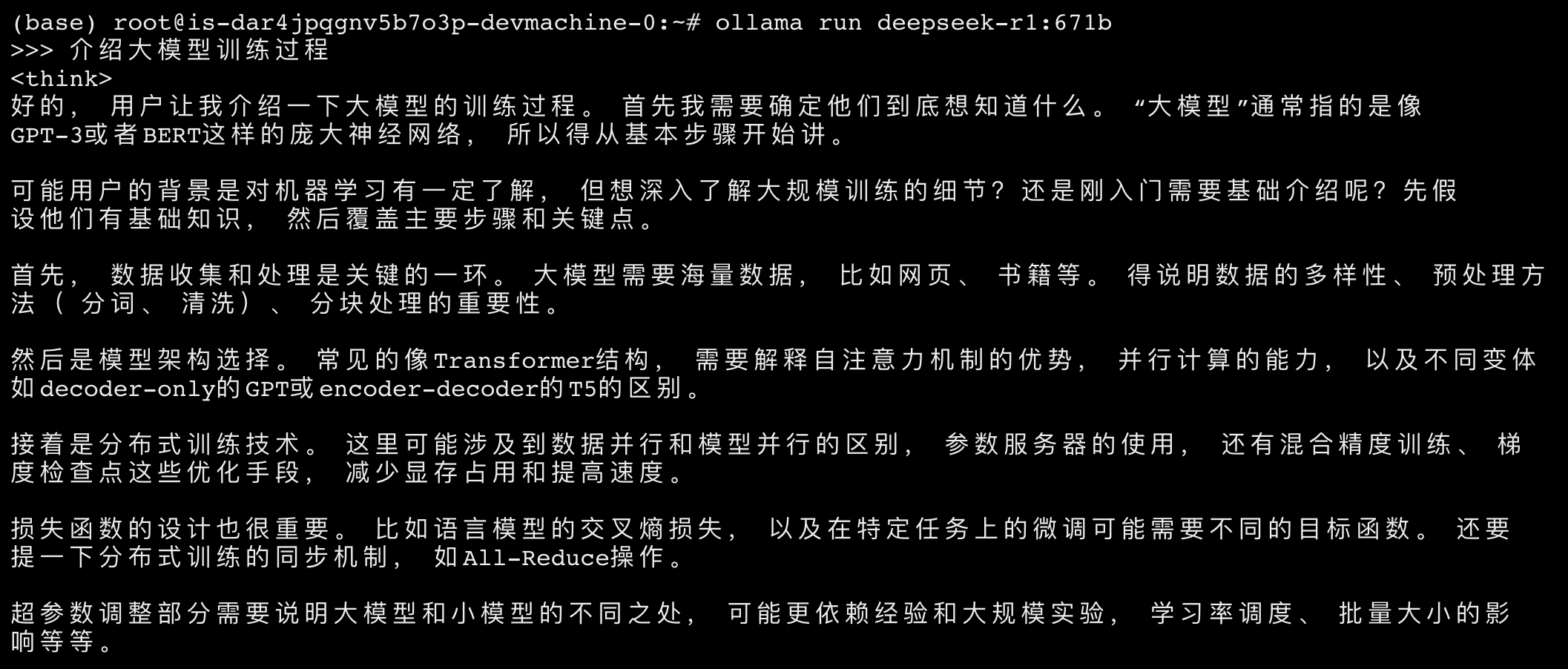
ollama run deepseek-r1:671b Type a question to get the model's answer. The content between the <think></think> tags is the model's reasoning:
2. API Calls
Once running, the ollama service listens on 0.0.0.0:11434, and the running model instance can be accessed through its API. ollama's chat API is compatible with the OpenAI API, so you can call the model with the following command:
curl --request POST \
  --url http://127.0.0.1:11434/v1/chat/completions \
  --header 'Content-Type: application/json;charset=utf-8' \
  --data '{
  "model": "deepseek-r1:671b",
  "messages": [
    {
      "role": "user",
      "content": "What model are you?"
    }
  ]
}'
3. Load Testing
Next, a load test of the deepseek-r1-671b model. LLM performance is evaluated differently from other services: request latency correlates with the length of the response in tokens, so the longer the reply, the longer it takes. That means concurrency or latency alone cannot define performance. Instead, the metric is "token generation rate at a given concurrency".
We wrote a python script for the load test. Its core logic uses multiple threads to simulate concurrent users calling the model API at the same time. From the number of tokens in each response and the response time, it computes the average tokens generated per second for each request, i.e. tokens/s/req.
Edit the model address, concurrency, and other settings in model_stress_test.py as needed, then run python3 model_stress_test.py to start the load test:
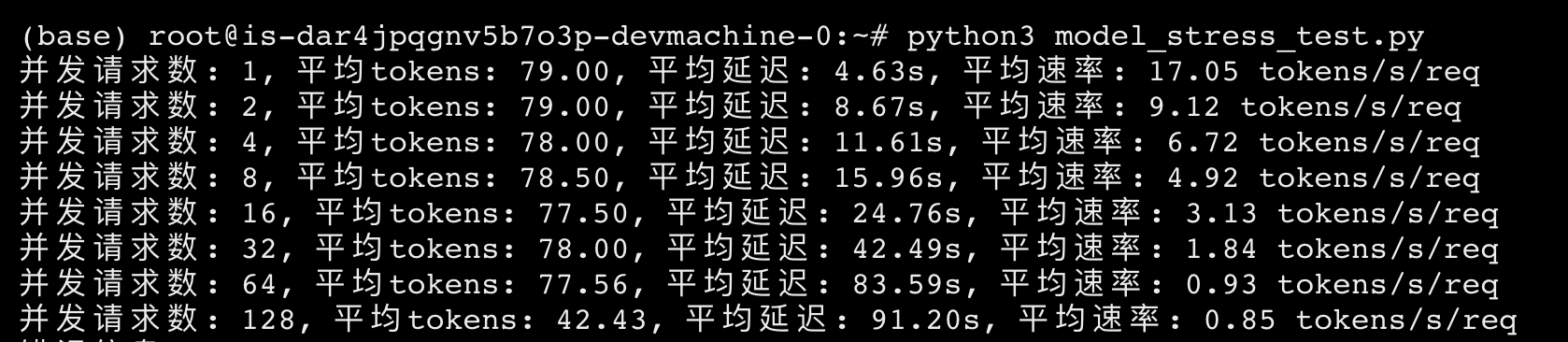
The question sent in each request was "What model are you?". The results are below. Once concurrency goes above 128, the average response time of a single request exceeds 180s, and usability drops sharply:
| Concurrent requests | Avg. rate (tokens/s/req) |
|---|---|
| 1 | 17.05 |
| 2 | 9.12 |
| 4 | 6.72 |
| 8 | 4.92 |
| 16 | 3.13 |
| 32 | 1.84 |
| 64 | 0.93 |
| 128 | 0.85 |
Run nvitop to see real-time GPU usage:
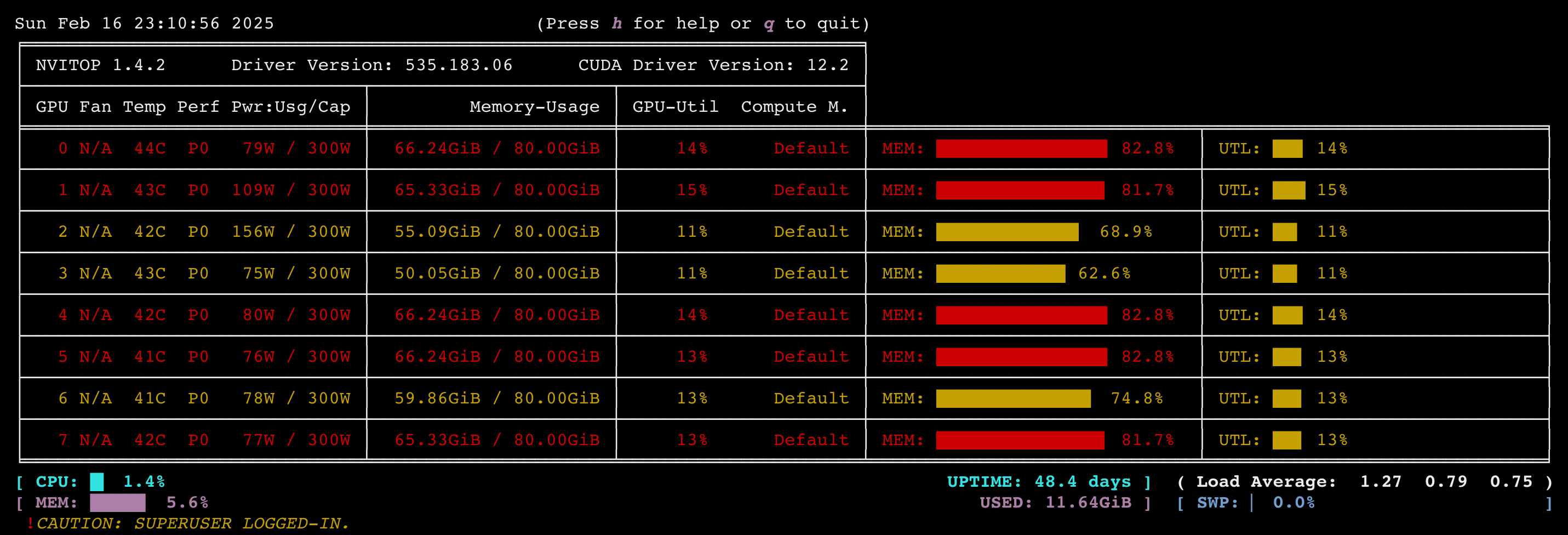
Even at 128 concurrent requests, average GPU utilization stays below 15%, so there is a lot of room for improvement. This could be a performance issue in the ollama framework itself, or the configuration may need tuning. Next we will keep working on performance and try other high-performance inference frameworks such as vllm.
Permalink: https://zhayujie.com/deepseek-r1-671b-deploy.html

在csdn里看到有人用你的项目卖钱,不知道是不是你本人,链接如下:
https://download.csdn.net/download/zhaomengsen/90453527?ops_request_misc=%257B%2522request%255Fid%2522%253A%2522e0e7975a8f5af158183a784dc0531ed3%2522%252C%2522scm%2522%253A%252220140713.130102334.pc%255Fcommercial.%2522%257D&request_id=e0e7975a8f5af158183a784dc0531ed3&biz_id=1&utm_medium=distribute.pc_search_result.none-task-download-2~all~insert_commercial~default-3-90453527-null-null.142^v102^pc_search_result_base3&utm_term=%E5%A4%A7%E6%A8%A1%E5%9E%8B%E5%AF%B9%E8%AF%9D%E6%9C%BA%E5%99%A8%E4%BA%BA&spm=1018.2226.3001.4187.4
谢谢提醒,不是本人,我的csdn账号是这个
https://blog.csdn.net/zhayujie5200